 In this post, we will show what was necessary on how to get access into the BR24BP battery pack for APC’s BackUPS RS/XS series of battery backups. Read more for additional details, caveats and some good to know general informaton on how you can replace the stock batteries in the battery pack with your own batteries to save money and time.
BIG MONSTEROUS LEGAL DISCLAIMER: This information is provided as anecdotal as-is information. It is recommended when working with electronic components to replace the defective component with a component of the same type, model and rating. Battery backups are no exception to this rule and as such we recommend that you follow the exact ratings as specified on your UPS, even if they differ from the information on this site. When in doubt, go with a 1-to-1 replacement, or better yet, purchase a replacement battery pack from APC directly. By following the steps in this guide, you indicate that you can not sue firestorm_v1 or those of us at YourWarrantyIsVoid.Com if you burn your eyebrows off or cause damage to loved ones or property, etc..
Now that the legalese is done with, let’s talk about this a bit.
Foreward:
Ever since the dawn of time, or at least the dawn of the computer age, mankind has been faced with one monsterous problem: How to keep the computer running when the power goes out. Even in the 21st century, we are still not immune to the power failures, surges and brownout/blackouts that plague our planet’s power grid. The solution was to use uninterruptable power supplies (UPSes) also commonly called “battery backups” to keep the juice flowing, even though the power from the electric company had ceased. The idea was that power would be stored in batteries and would be used through specialized circuitry to recreate the line voltage that our beloved machines needed to operate. The idea was a grand saviour to the information age and since then have saved countless months of uptime loss, unavailability and other such lack of availability.
However, with every great solution is a thorn in its side. In our case with the batttery backups, the thorn is the batteries. Every now and then, through regular use and standby charging, it becomes necessary to change them out. Usually this cost is a lot less than just buying another battery backup and is a preferred method to keeping old but still usable UPSes out of the trash can. In my specific case, I have an APC Battery Back-UPS XS 1500 and it has served me extremely well through the years. Unfortunately an extended power failure had knocked it and the addon battery pack, BR24BP out of comission and had rendered the UPS useless.
Initial examination:
Pior to just ripping the face place off of anything, even if it pisses me off, I perform a good bit of research using Google and Yahoo to attempt to find disassembly instructions for something. In the case of the battery backup’s battery pack, I had nothing but a bunch of forum posts with people looking for the same details. Unfortunately no solution was to be had so I started investigating on my own and was ultimately successful. This writeup is a testament to those findings and a howto for anyone that was as lost as I was with trying to find a way in.
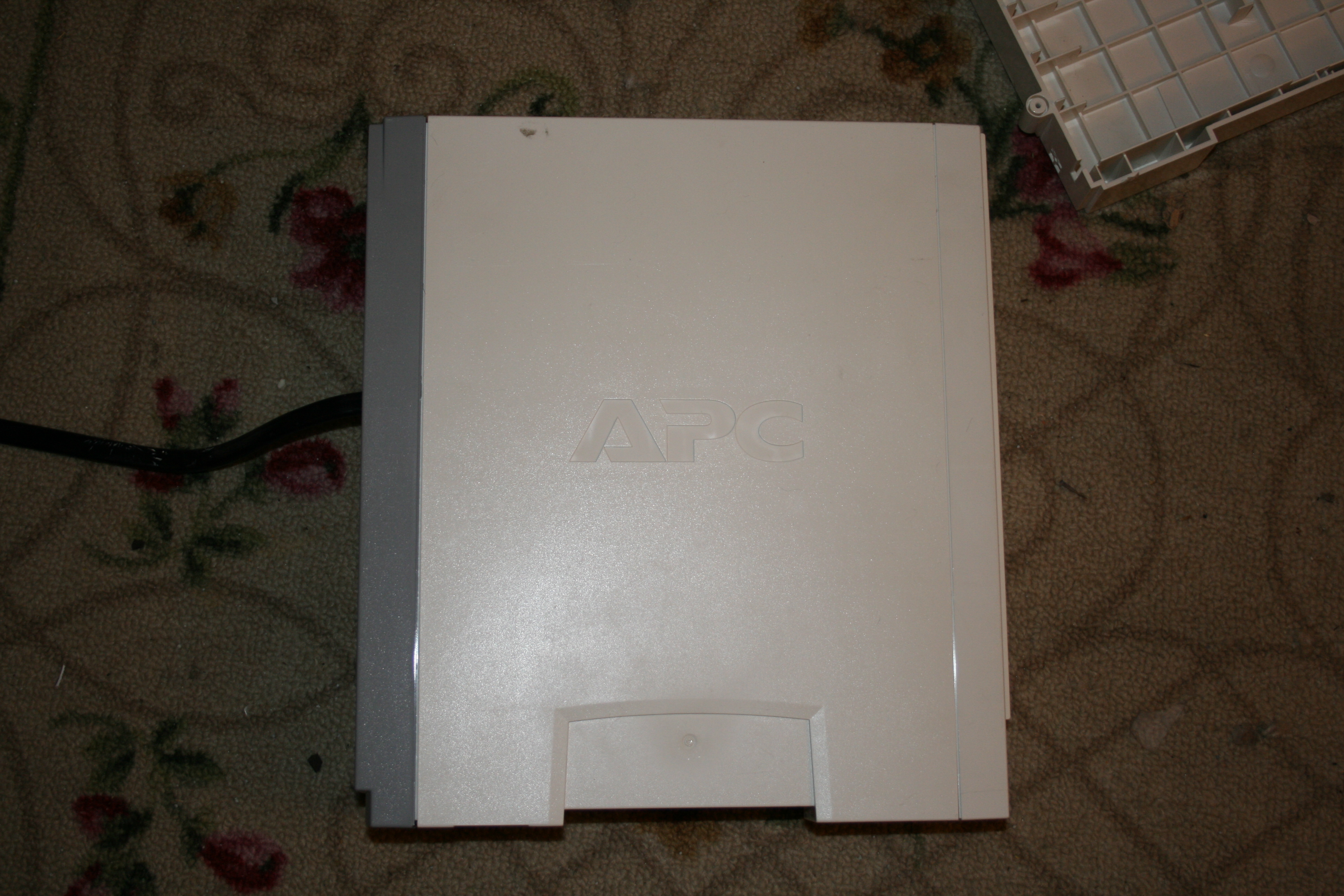
This is a shot of the BR24BP in all it’s glory. Despite it’s innocent looking exterior, it’s a mofo to get into. With no visible way of getting in, I set out with my metal screwdrivers and started prying like a madman. Eventually, I was able to get the white front cover off and the secret to this beast was unlocked.
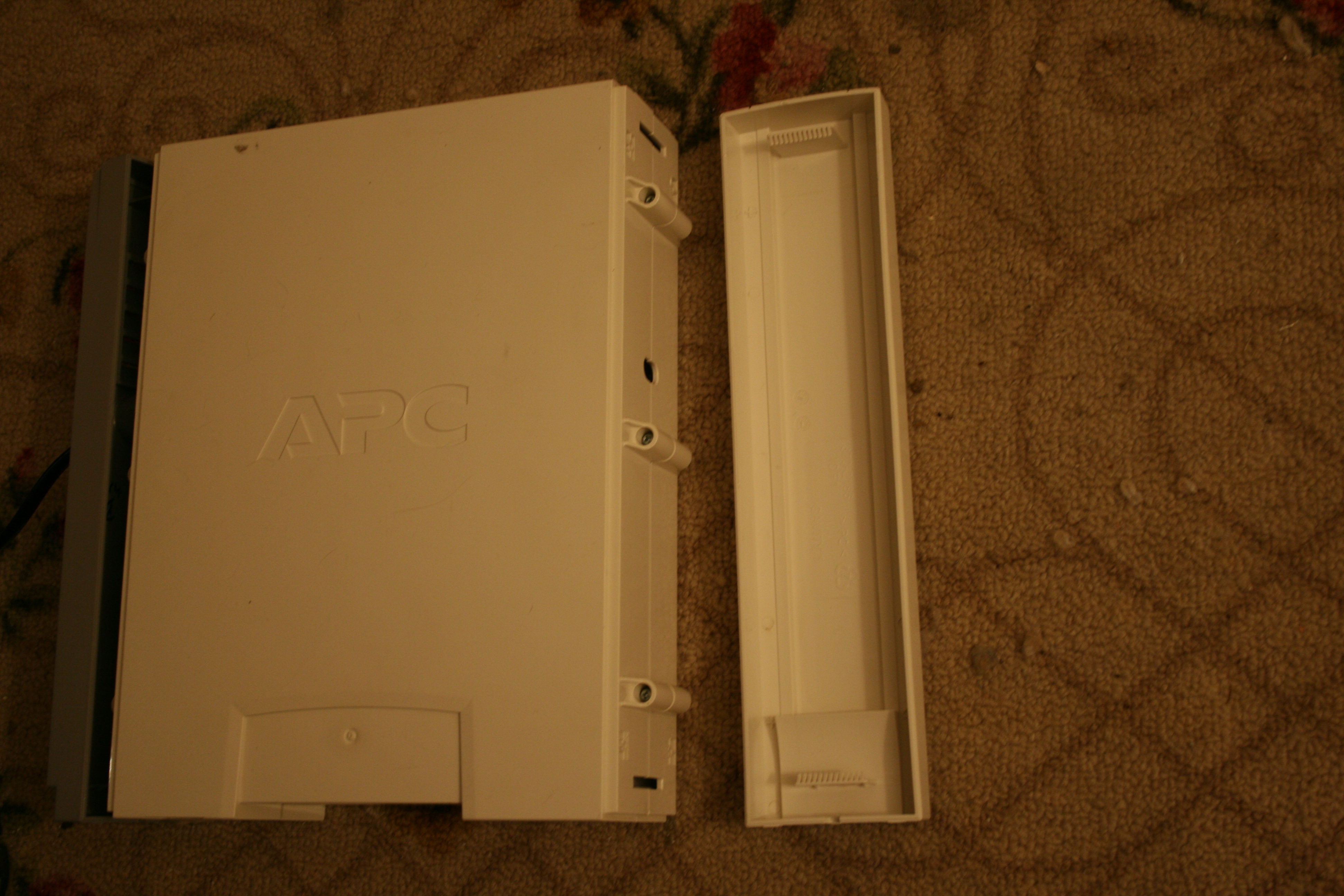
(The grey piece on the back was held together much in the same fashion, pardon editor’s fault for the back showing ajar. 😛 ) In this shot, we learn something important. The front is not held on by any fancy method, locking mechanism or other trickery. It is held to the front of the battery backup by means of a pair of snaps. One at the top of the cover pointing down, and one at the bottom cover pointing up. It would be almost trivial to modify the case so that you could get into the battery box at some point again to do a second swap out fo the batteries.

Here is a shot of the front cover. The back cover is identical to this except it is grey and has a hole for the power cable to go through. It could be theorized that the ends of the snaps are sliced to prevent from someone gaining access to the innards of the battery box. It could also be theorized that a quick session with a Dremel could prodice a hole with which to pry up on the snaps to gain access in the future without having to pry the case open like your life depended on it.
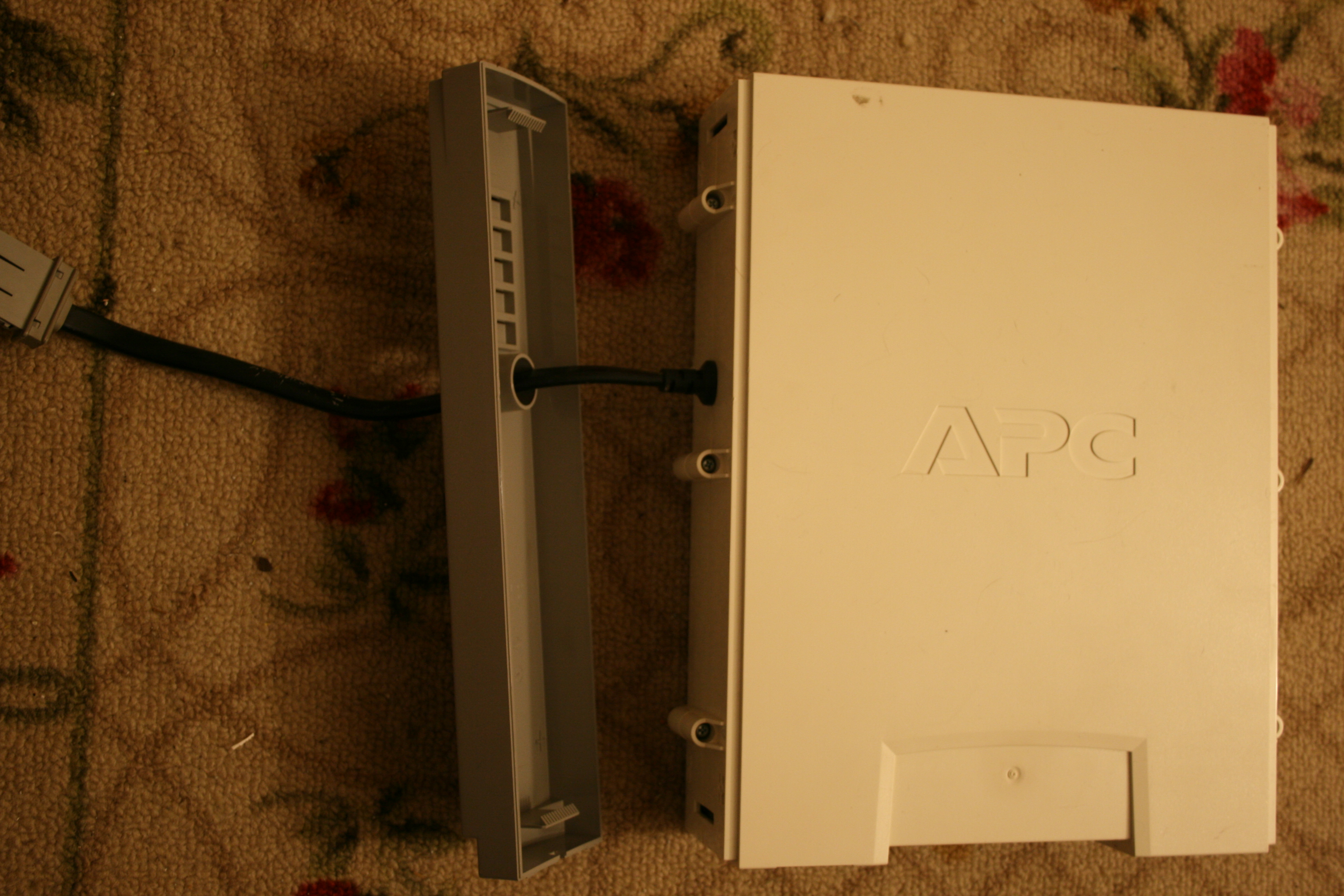
This is a shot of the rear cover after being pried off. The thin holes at the top and the bottom are the holes for the snaps. Once finally freed of both the front and the rear faceplates, we are left with the battery box and six phillips screws from victory.
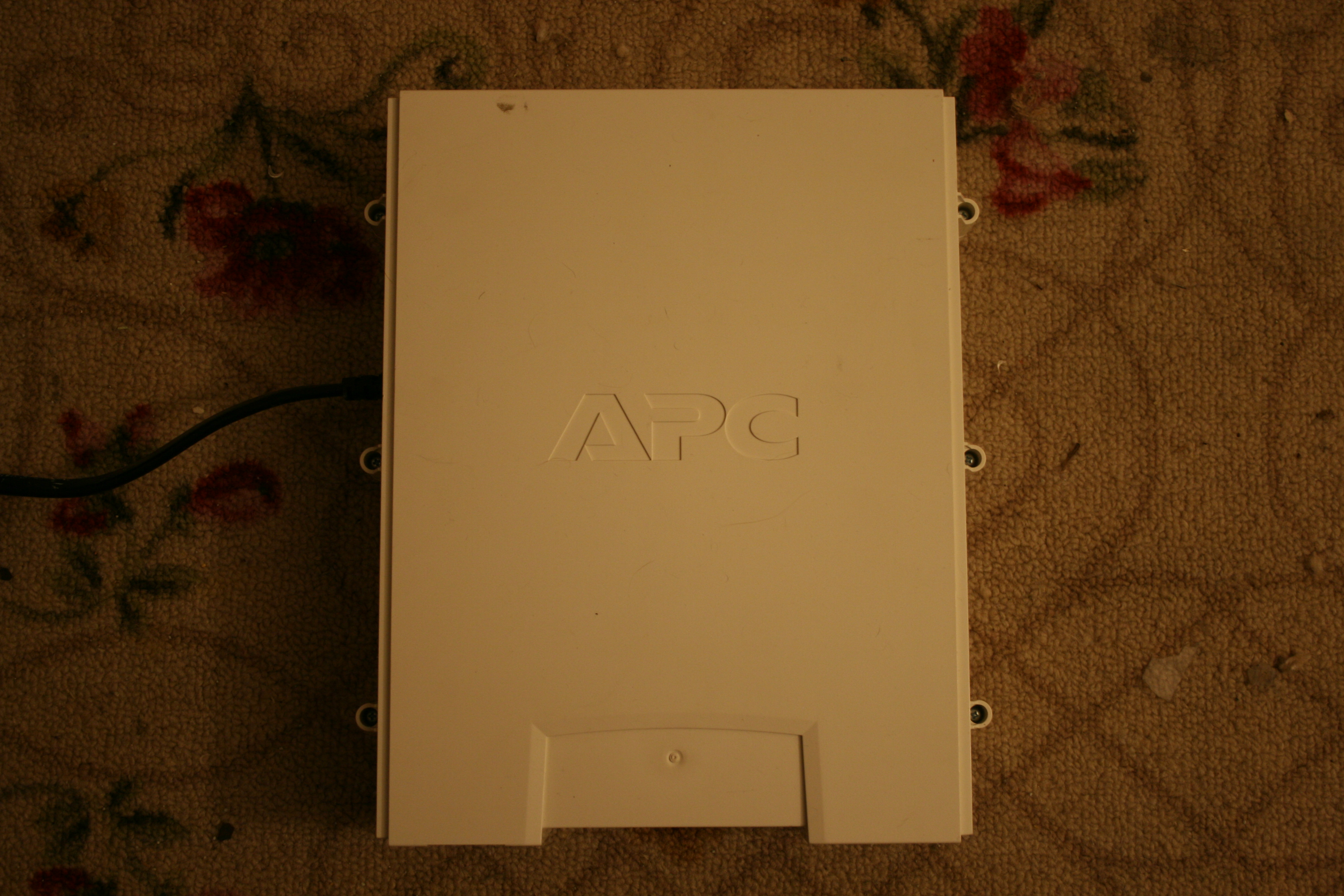
In this shot, we can finally remove the only screws in this battery pack’s setup and pull off the cover to reveal the batteries inside. One special note about the covers. They are omni-directional (Editor’s note: omni-sidal seemed to not be a word. 😛 ) meaning that the “left” side could easily be the “right side”. The only thing that determined direction was that the indentation for the pedestal foot was at the bottom (pointed towards you if on a table) and that the cord came out of the “back”. Aside from that, it was anyone’s game.
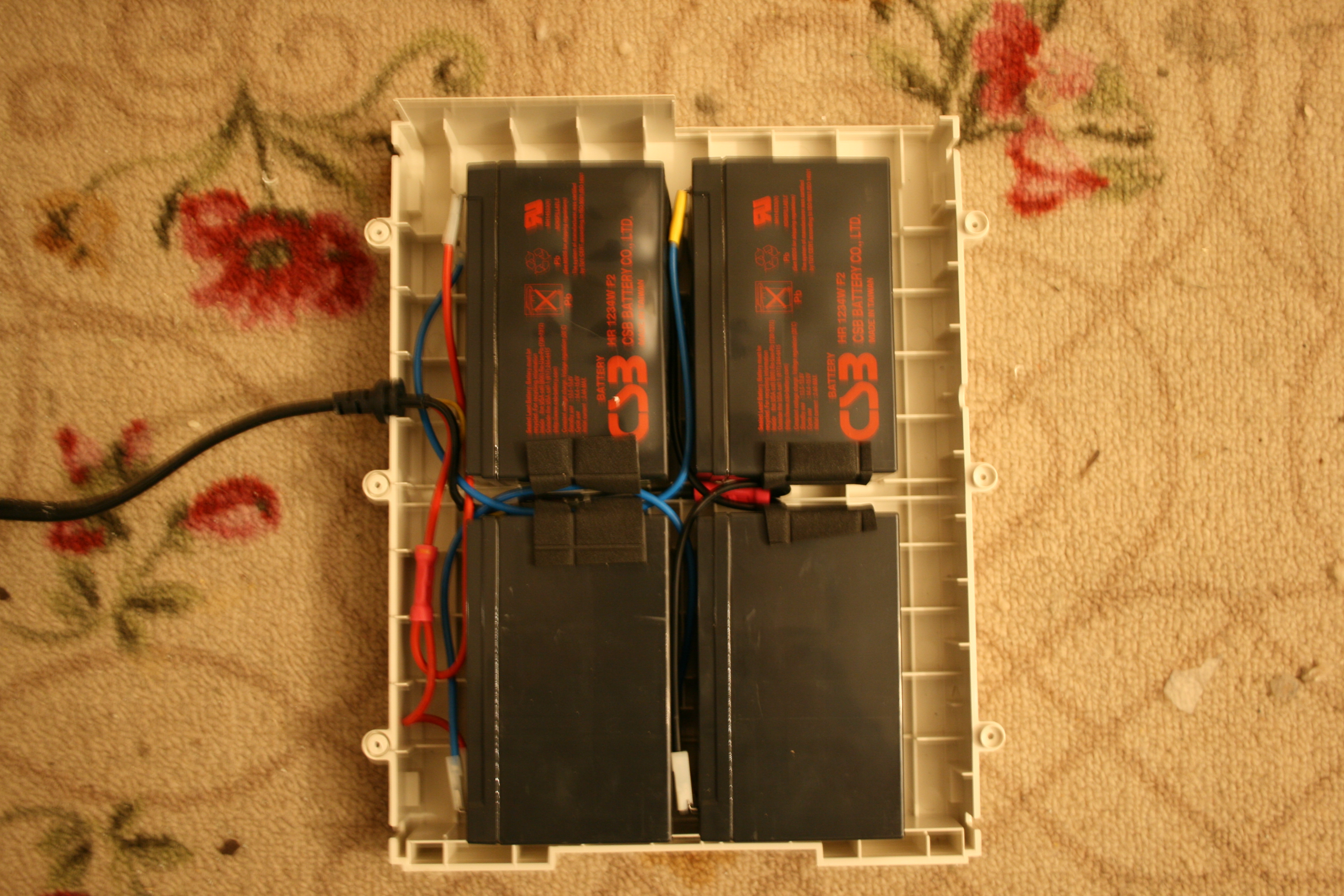
(I apologize for the blurriness of the full-size picture, just use the thumbnail for general positioning data.) Behold, here is the batteries in all its glory. Keep in mind that my top two batteries are “poofy” and need to be replaced. The bottom ones, are not poofy so will get taken to a battery place to get charged and tested.
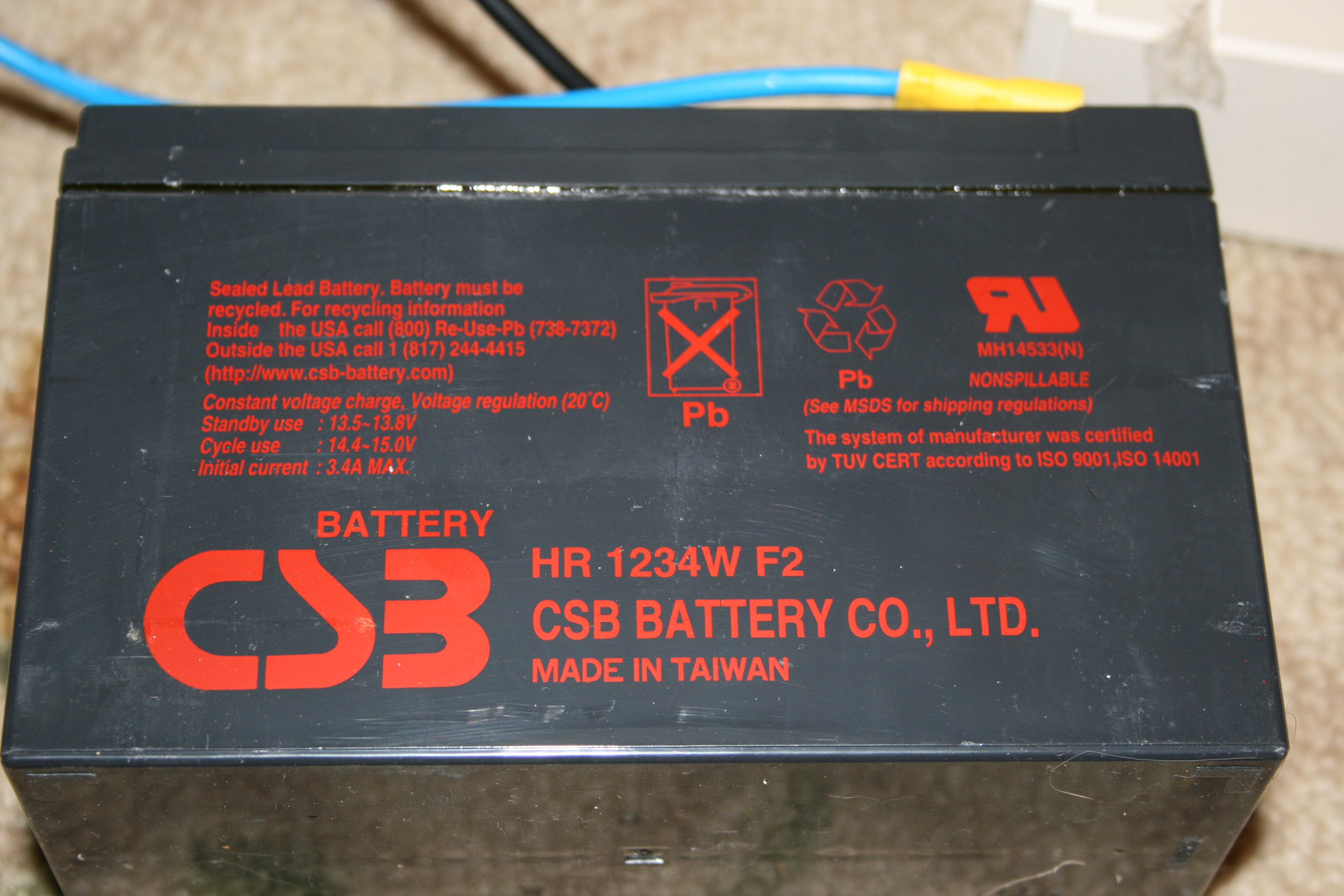
Before we get into wiring diagrams and all that nonsense, please make sure you use the right battery. These are 12 volt, 3.4A batteries. CSB# HR-1234W-F2 and are the Sealed Lead Acid (SLA) type. IT IS CRITICALLY IMPORTANT THAT YOU USE THE SAME TYPE AND RATINGS OF BATTERIES IN YOUR UPS. EXTENDING YOUR UPS MAY GIVE YOU ADDITIONAL UPTIME BUT WILL CAUSE YOUR ADDITIONAL UPTIME TO FAIL AS THE CHARGER CIRCUIT CAN NOT HANDLE THE EXTENDED CAPACITY! (Can I say this enough?) If you are in doubt about whether or not you have the right battery, take one from the pack to an Interstate Batteries or a Batteries Plus and get four just like it. Bring them home and wire up as covered below.
Wiring it all up:
The interesting thing about this pack is that despite the link that I found for APC, this is actually a 24VDC system, not a 12VDC system as advertised. Granted, the batteries themselves are 12VDC, but they are hooked into a 12x2x2 array meaning that the batteries are connected in series (to make 24VDC) and then are connected in parallel to another pair connected in series. The entire thing ends up being a 2x 24v array as shown in our next picture:
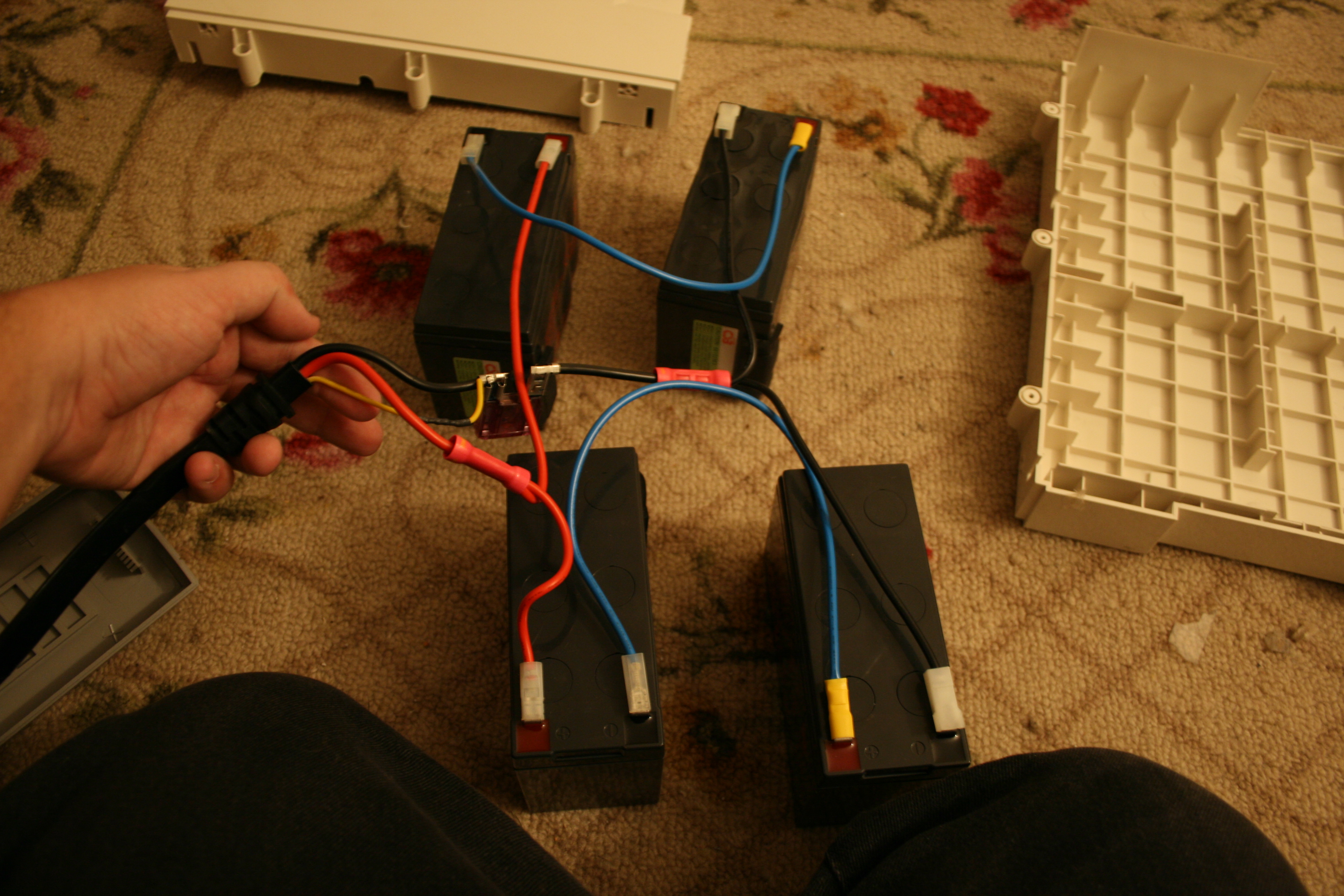
Ok, so let’s review this hookup. The umbilical cord that goes to the main BackUPS is in my hand. For now, ignore the little yellow wire. It has nothing to do with our hookup at the moment. Clockwise from top left, we have the UL (upper left) battery, UR (Upper Right) battery, LR (Lower Right) and LL (Lower Left) batteries. The umbilical has two positives and two negative leads on it. WHEN HOOKING UP BATTERIES, YOU MUST OBEY THIS IMPORTANT RULE: AT NO TIME WILL THE POSITIVE AND NEGATIVE OF THE UMBILICAL BE ON THE SAME BATTERY!!! THIS WILL CAUSE AN EXPLOSION AS THE 24V BATTERIES TRY TO (AND SUCCEED) OVER CHARGE THE SINGLE 12V BATTERY! That being said, connect one of the RED wires to the positive terminal on two batteries and connect the BLACK wires to the other two batteries’ negative terminals. At this point, all four batteries should be connected with one connection from the umbilical. Connect the BLUE wires from the positive battery’s NEGATIVE terminal to the negative battery’s POSITIVE terminal. In essence, you have created two 24 volt battery packs made of UL and UR, and LL and LR respectively.
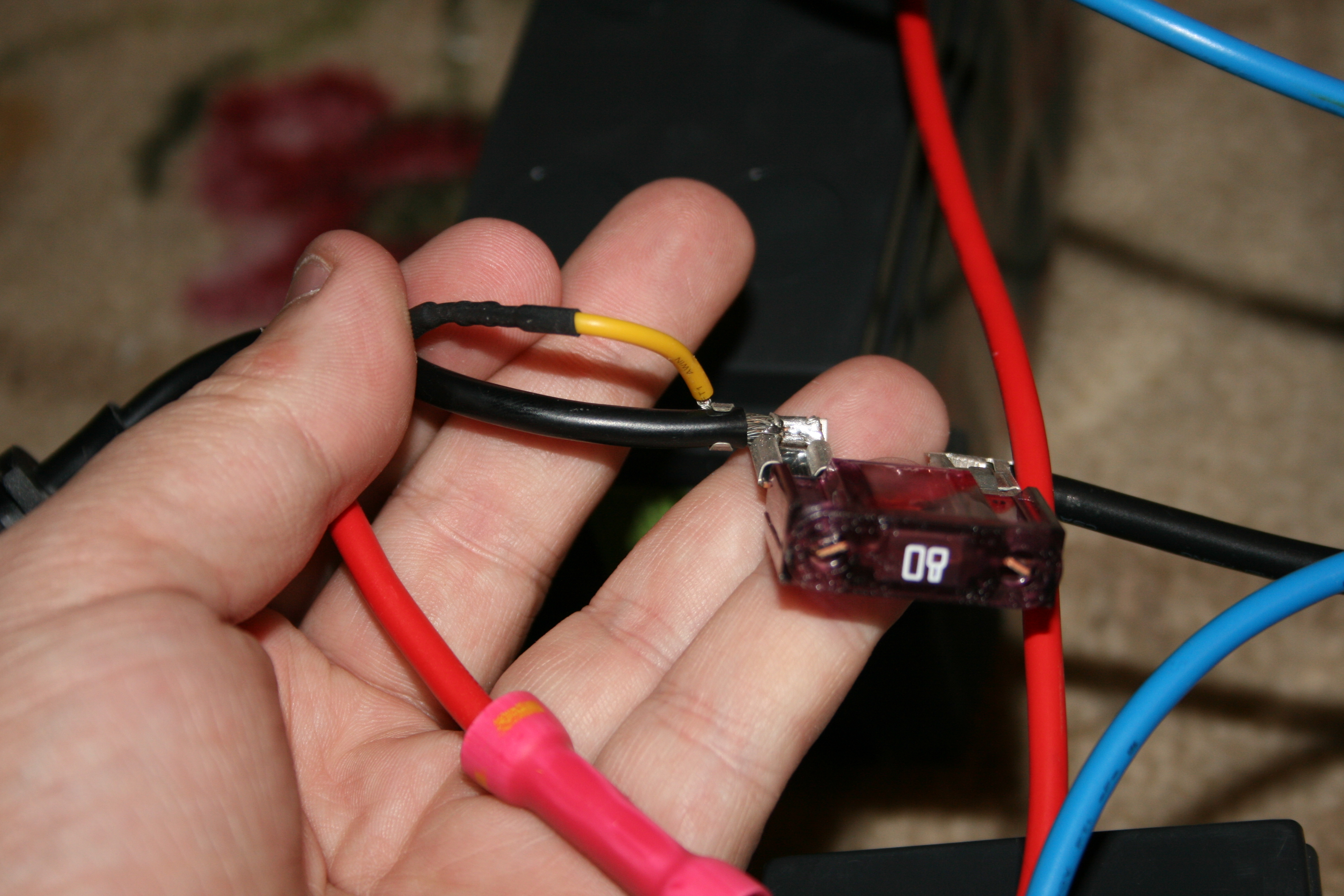
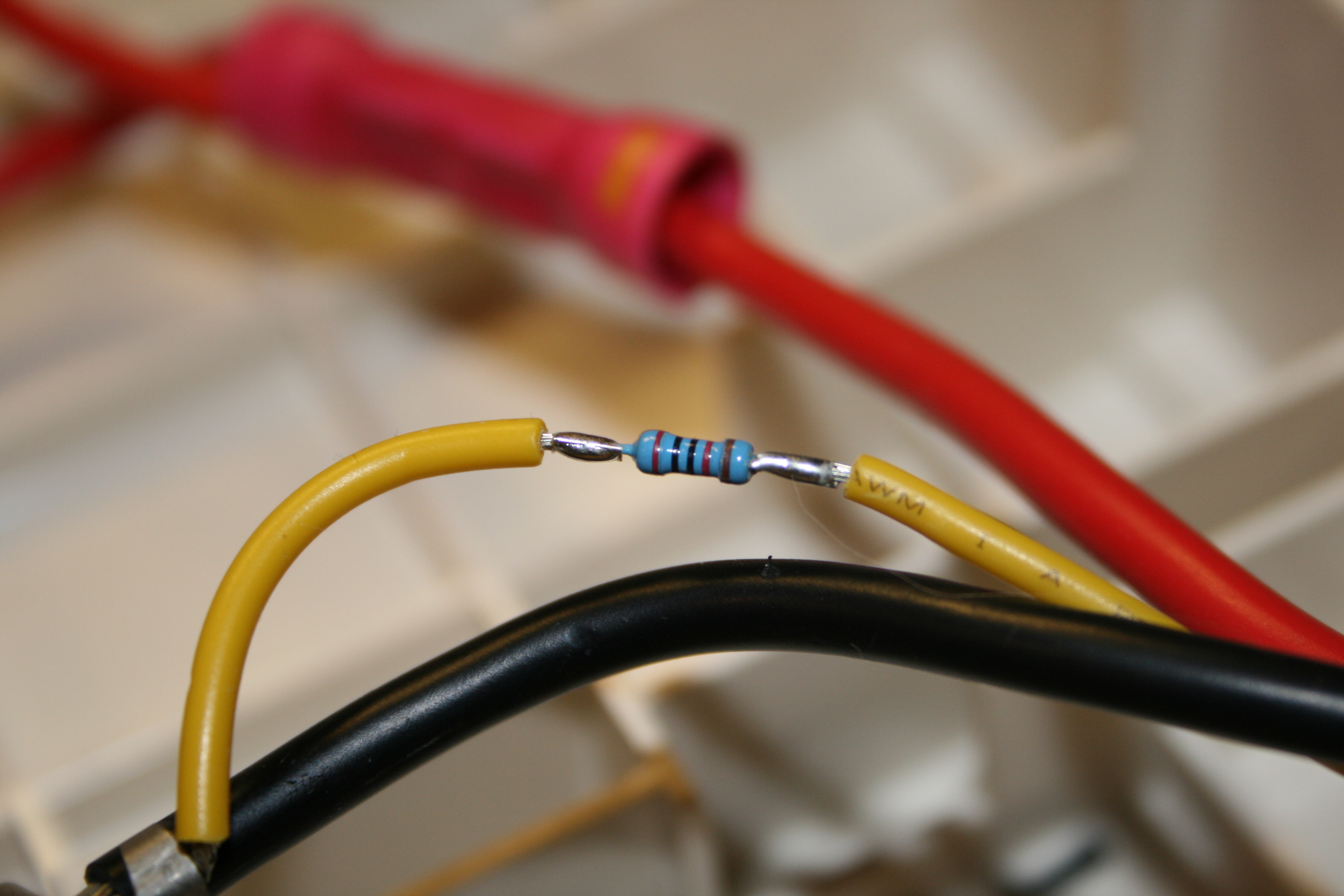
Now, back to this little yellow wire (and the 80A fuze) This wire acts as a “Sense” for the battery backup to determine the battery pack’s overall health. The wire has a resistor shrinkwrapped inline with it and should not be tampered with. Doing so may adversely affect the UPS’s operation.
Afterthoughts:
It’s been fun dissecting this battery pack however it was hard as hell initially. APC does not make it easy to pry open the front/back of their UPS battery packs. I’m hoping that someone aside from myself finds this information useful as it was not easy obtaining it. If you have any information on where to get good replacement batteries, or you wish to share your experience, feel free to fire back at me in the comments section.
Until the next post, happy hacking!
FIRESTORM_v1
UPDATE!!! 11/10/09
Readers Derek and Shaaz commented concerning the resistor that was inline on the yellow lead of the power cable. After performing some investigative research (edit: I tore off the shrinkwrap), I have found that it is a 1% tolerance metal oxide film resistor. The resistor color code is Red, Black, Black, Red, Brown which indicates a value of 20 ohms with a tolerance of 1%. The tolerance is key as I am still of the opinion that this is how the APC backup monitors the battery level and is able to determine the level of power left. I would not suggest using a standard resistor instead of this 1% tolerance resistor as this will affect how long the UPS thinks it has on charge remaining.
Reader “Steevo” wrote in to catch me on a critical error in regards to this resistor. M initial calculations were incorrect, the value of this resistor is not 20K ohm, but rather 20 ohm, Please make sure you use the correct resistor if you ever need to replace it.
UPDATE: More details about the power connector from the BBU power pack to the UPS
After requests for information in regards to the power pack’s connector, I realized that I had made a serious oversight. I had not documented the power connector that connects the battery pack to the UPS body. With this in mind, I took some more pictures of the connector:
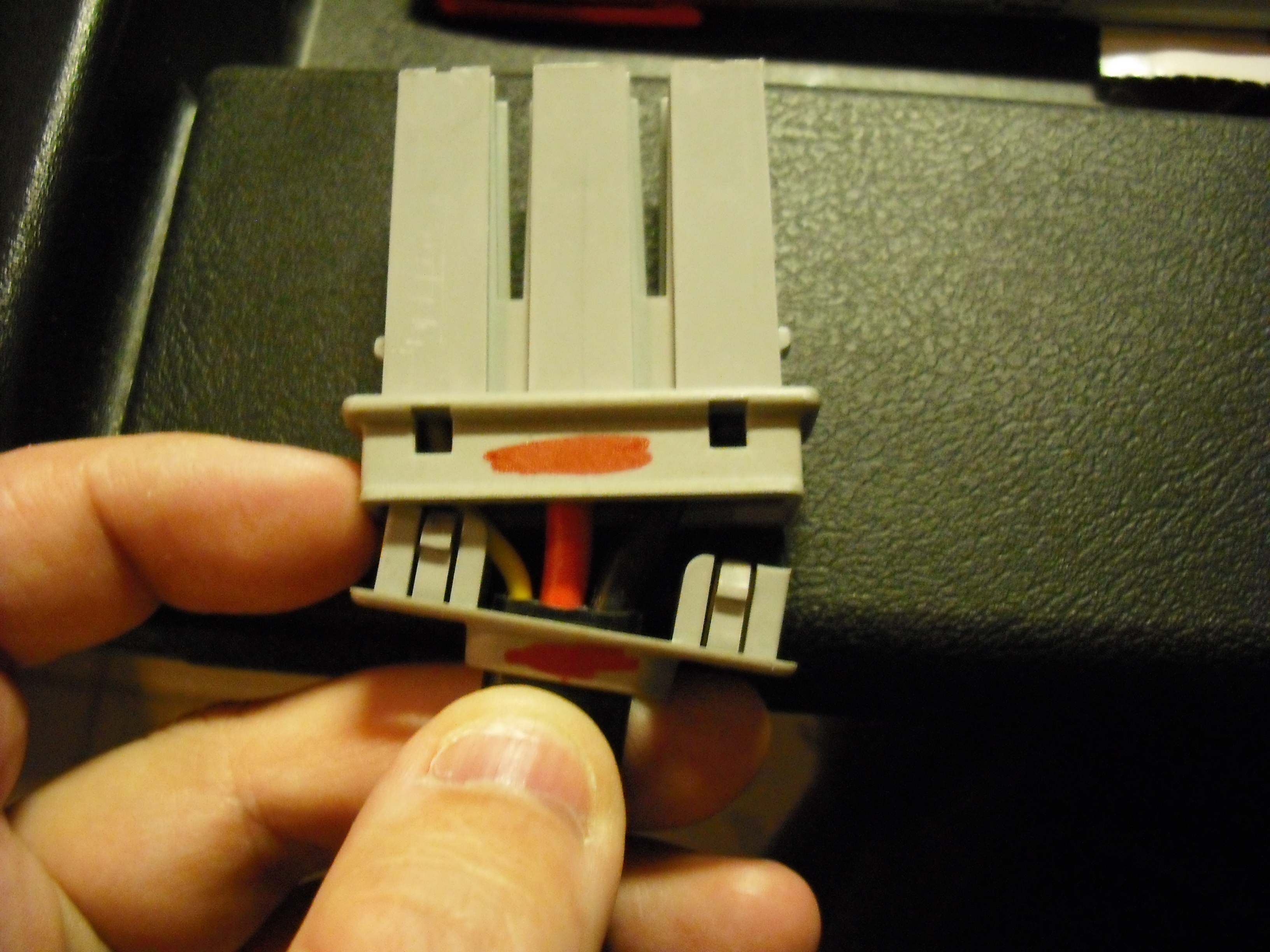
The power connector has four pins holding the strain relief on. After getting the pieces pried apart, the end connector slides off and you can then see the wiring on the inside. Barring that, I went ahead and was able to extract the outside case off of the three spade connectors as shown here. In order to extract the three spade connectors, you will need to take a long sharp screwdriver and pry the plastic clips holding the spade connectors down.
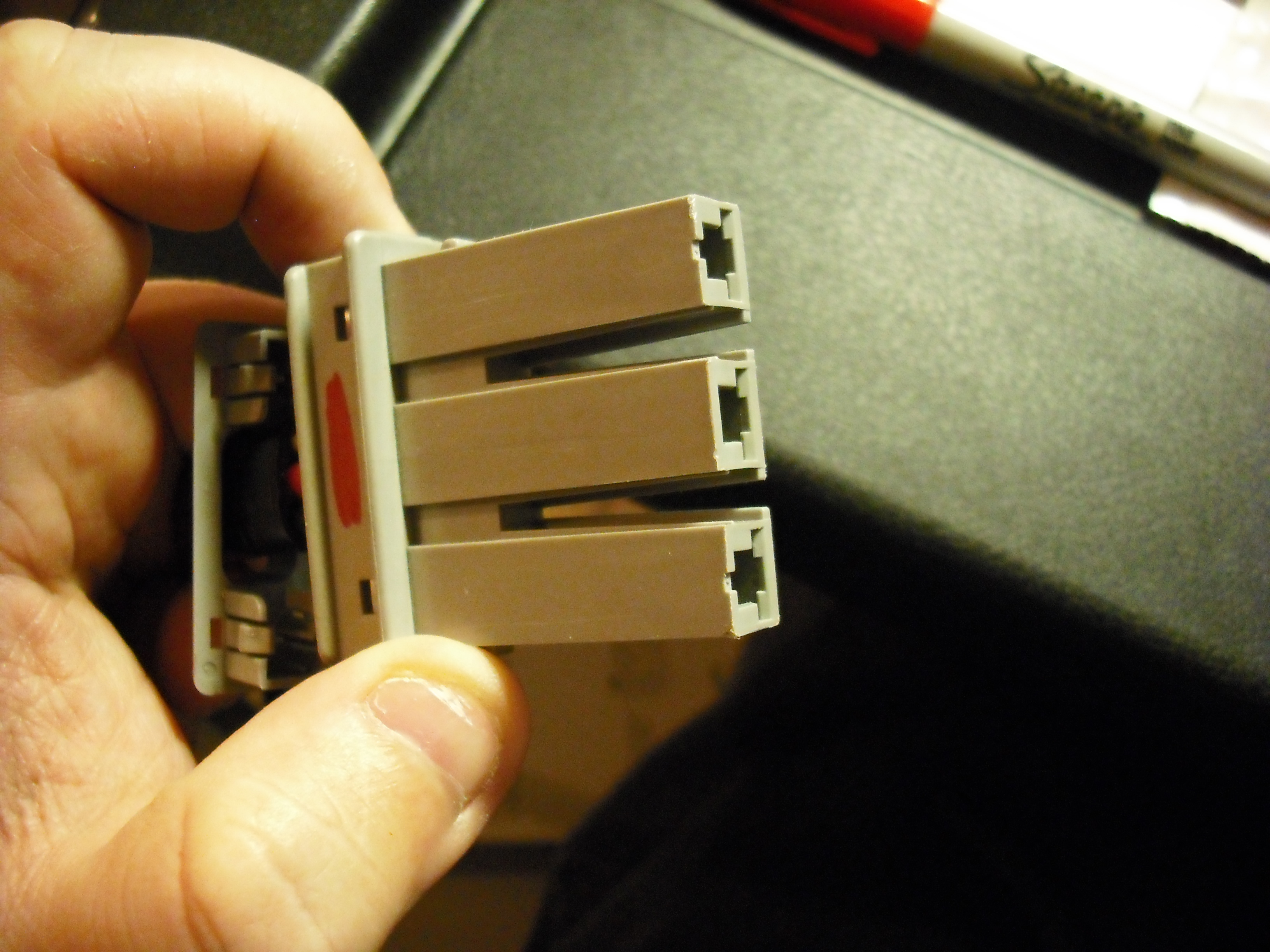
Here’s the connector with the spades having been successfully extracted:
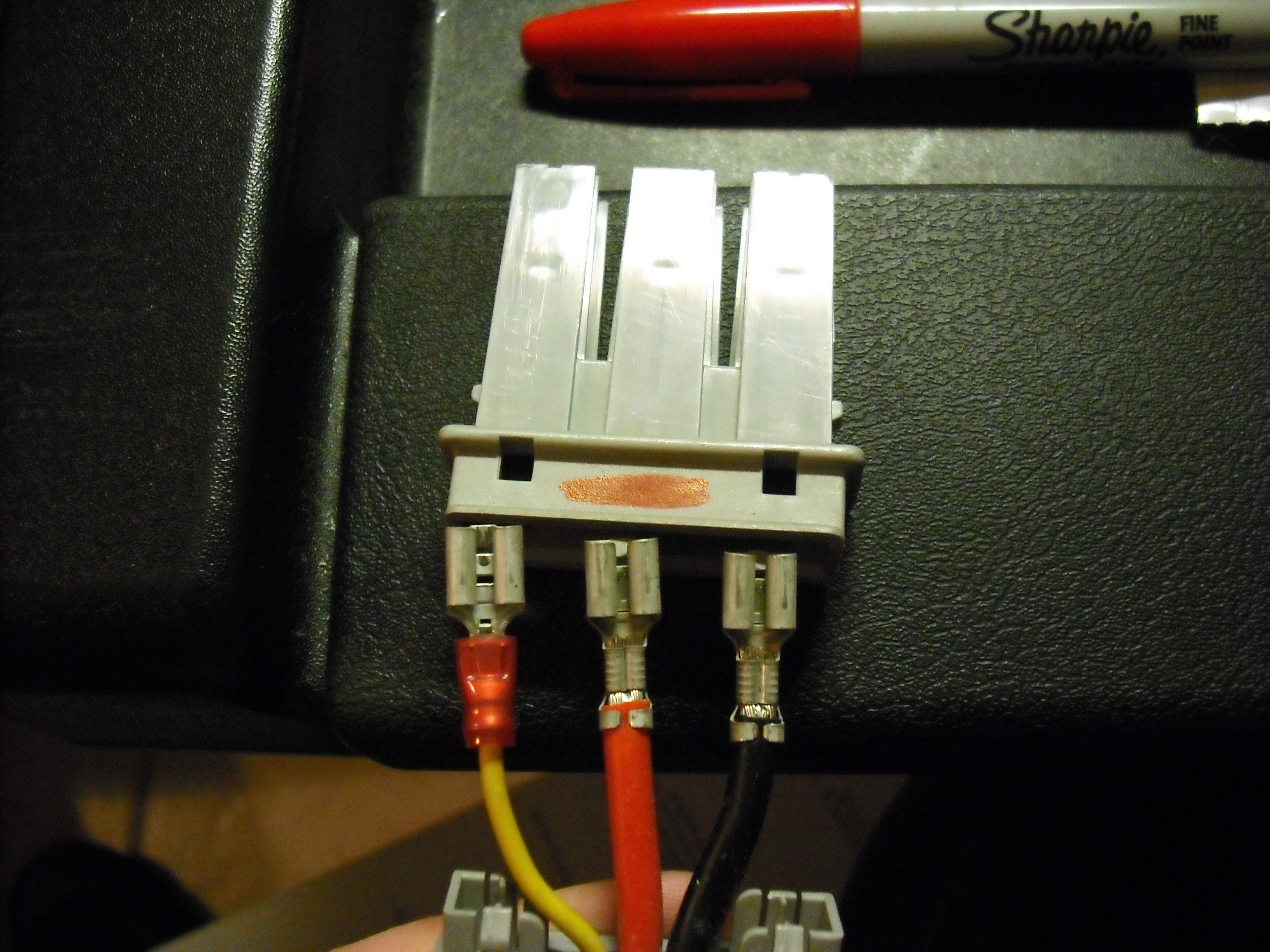
Keep in mind that the plug orientation is not certain as I’ve reinstalled the UPS and it’s buried under the desk. The red mark on the connector jacket is there for orientation purposes, but interfacing with the UPS may require that the black wire is on the left, and the yellow wire is on the right.
First of all: thanks for such interesting and detailed information! I just got my APC BR1500 out of a long sleep (3 years in a box…), changed the batteries and It is operational again! Now I intend to build the battery extension module (not available in the market anymore!). Acquired 4 new 12V 9ah batteries, connectors, etc but I am struggling with the resistor! I could not find the 20Kohms/1%, so I intend to use 2 10Kohms/5% in series. Any comments? Did you discover what is the real purpose of this resistor? Thanks in advance! Marcelo
Can I safely plug in an single RBC33 pack (2 Battery configuration) into the RB24BP port on the backside of my RS 1500 and therein by extend my UPS uptime?
Hello Chris:
I am unsure on this. It really depends on whether or not the devices are compatible. If I remember correctly, the BR24BP had a 24V potential across the power connector and I am not sure if the RBC33 does or not.
FIRESTORM_v1
Hello Marcelo:
That resistor has had quite the debate from the earlier comments on this article. I believe it is either used as a current-sensing device or possibly a method for the Battery Backup to be able to detect whether or not the BR24BP is connected. I am not sure what the ramifications are of connecting the BR24BP up without that resistor in place (either the BR24BP won’t work at all, the BR24BP won’t charge, or the runtime of the battery backup may be wrong in software).
Good luck!
FIRESTORM_v1
This is the definitive site for this mod/repair. Thanks for your information. I see people asking where/how to acquire the connectors, and other people saying that have found them. Is there any source aside from locating an expired unit to scavenge the plug from? I see none of these on ebay or craigslist… I would rather not fabricate my own connector here… does anyone know who the manufacturer is of the connector? Is it also an Anderson connector? This connector is the only thing holding up the show. Any ideas on how to fabricate a connector without dismantling the unit? Thanks for your write up FIRESTORM_v1 and thank you for any information you can provide. take care —
Thanks for the info on how to open the BR24BP! The original batteries were shot, and now I get a few more years!
Obrigado amigo isso foi muito útil pra mim!
Thanks for this excellent explanation. I have been thinking of extending the capacity of my RS1500.
I have recently acquired a new RBC33 pack as I thought it was time to replace the old one. However, I notice that the original RBC33 pack is in good condition. So, my question is:
Can I plug in my extra RBC33 pack into the BR24BP port on the backside of my RS 1500 and therein by extend my UPS uptime?
Has anybody tried it yet?
From the pictures you showed of the BR24BP, it looks as if it has two RBC33 packs connected parallel AND there is this infamous 20Ohm 1% resistor.
Is this resistor required if I only connect a single RBC33 into the BR24BP port???
RGDS
I spoke with my friend about that resistor and it looks like it could be:
120Ohm with 2% or more likely it is 2.2 ohm and 1% – this is diagnostic connection with recognize the connected battery (capacity)
Thanks, We looked at your pictures and carefully drilled small screwdriver shaft sized holes under the tabs. We pushed in and pried up and the front and the back popped off nicely. You only need the holes on the top tabs. Once you peel it off the bottom ones fall off. Thanks for this forum!
Is there an extension cord to link the existing battery power cord to the primary UPS? Even an additional foot would help. I actually have a two tiered stand which would allow me to save space by stacking the two units instead of having them side by side.
Hello Randy:
I’m not sure of any such extension cord, although if you wanted to get creative, you could but the BR24BP above the UPS upside down and reorient the batteries so that the power cable comes out of the expansion pack from the bottom instead of the top. This may be your best solution as IIRC, the power cable connector is at the top of the UPS.
Good luck!
FIRESTORM_v1
Hello Bret:
That’s a good idea. Unfortunately, my UPS succumbed to a direct lightning strike and gave its life so that the servers in my rack could live.
FIRESTORM_v1
Hello AMG:
I have tried for many years to find the connector (grey connector) for this as the individual wires are simple spade connectors, however I have yet to find one. For now, and it would appear for all time, the best place to get one would be from one that has expired. My unit went the way of the dodo after not surviving a direct lightning strike a year ago. If you do manage to find a source, please reply and let me know, they are in demand here.
Happy Hunting!
FIRESTORM_v1
Hello Manos:
I personally haven’t tried it, but would recommend that you proceed with extreme caution. Do some research and some probing with a voltmeter, see if you can validate that the battery packs are the same in regards to voltage and pinout. The BR24BP uses two 12v cells in a 2×2 configuration, giving you a 24V hot lead. If your UPS isn’t expecting 24V, it will most certainly cause damage.
The resistor has been in hot debate since I wrote this article. There are some theories that it is used to detect how much power is left in the batteries and there are some theories that indicate it tells the UPS what kind of battery pack it is so the UPS can handle accordingly. I would say that if you are going to emulate the BR24BP, you add all the parts as shown in the images above. You don’t want to risk damaging your UPS because of a missed ten cent part. If you do test and everything works out well, let us know!
Thank you.
FIRESTORM_v1
Hello Joe:
If you follow the images in the article, you should be able to swap them out. I’d recommend swapping them out one at a time to minimize the chance of wrong connections.
Good luck!
FIRESTORM_v1
Excellent work! On the BACKUP-UPS RS1500G it is possible to use 1/4″ spade connectors to make the connection to the internal power terminalas stated by your other respondents. This has worked even without attaching the third yellow wire.The UPS will continue running but the battery will show 0% charge.
Could you please confirm that the the resister has a gold band an one end. I looks red in my image. Secondly and more importantly could you confirm that the resiter is solder to the the connector that is attached to the fuse?
Thanks you in advance. I will let you know if this makes the UPS report the second battery.
Please accept my apologies for the spelling errors and incomplete statements in the previous post. I was in a hurry and did not check it carefully!
1) The configuration is using 2 car batteries capable of supplying 25 Amps for 100 minutes as the extra backup battery pack. The “yellow sense line” was not connected.
2) With the UPS disconnected from the AC power the voltage across batteries in series dropped to 24.2V from 25.2 after 4.5 hrs with a load of between 100-250W.
3) The UPS signalled the servers that it was out of power after 30 minutes and battery level was at 0% even though it continued to supply power.
Further testing of the “yellow sense line” indicates that with no connection on that terminal the voltage is 3.2V with power supplied to the UPS and the batteries being charged.
1) When a 22k ohm resistor is attached to the terminal and the other end is attached to the negative terminal of the extra battery pack the following occurs
a) The voltage at the terminal drops to 1.8V
b) The UPS fan turns on
c) The UPS time remaining display changes from 30 minutes to over 100 minutes for a load of 160W.
d) When fully charged the remaining time reported is 195 minutes for a load of 125W.
2) The UPS fan never turns off with the sense line attached even after the unit is fully charged.
3) The configuration took about 5 hours 15 minutes to come to a full charge.
It is my suspicion that the sense line is a logic signal that only indicates if the extra battery pack is attached. My reasoning is as follows;
a) The 3.2V is a standard logic “H” level
b) The 1.8V is at the high end of a logic “L” level. Most likely because the 20K ohm resistor was replaced by a 22K ohm resistor.
c) The negative terminals of the internal and extra battery pack are connected together. Therefore attaching the resistor to the extra battery pack has the same effect as attaching it to the internal battery.
Hopefully this is of some help to others attempting to do the same thing. As A side note I have not attempted to try to run the UPS a long as possible. When that situation occurs I will update you.
Thanks again for solving a large piece of the puzzle.
thanks for the legwork and advice. just letting you know 5 years later someone’s still finding it useful.
because it was asked and in case anyone else cares, atbatt.com was the best place i found after a good amount of searching for quality batteries for a good price.
It would be great if you could measure that resistor with a cheap ohmmeter — Harbor Freight has multi-meters for $4.99 that would work.
I’ll chime in and assert that the resistor is either 20k 1% (most likely) or 120 ohms 2%. The fact that George Zannis made this work with a 20 ohm resistor indicates that the value is probably not crucial — the resistor in your picture is almost certainly not 20 ohms.
I suspect that the yellow wire is only used to detect that a battery pack is plugged in when the 80A fuse is blown. The other possibility is like others mentioned — the value may indicate the size or type of battery pack plugged in.
I’m going to try that myself soon and will report back if the 20k value works or not.
Awesome! Thank you so much for your post! I have two of these beasts (and of course two RS/XS Back-UPS) and a dozen dead batteries. I’ve put SLA1088 (if my recollection serves)… are these 12VDC 9Ah batteries the same as you’ve mentioned, or did you find a diff spec in the UPS than in the battery pack? I’ll probably have more insight minutes from now, but most importantly: Thank you for the post!
PS: I like the checkbox!
Hi,
Can I add more than 4 packs of batteries on this one ? What do I need to change in the circuit ?
See:
http://www.apcmedia.com/salestools/DFAH-8GLR62/DFAH-8GLR62_R0_EN.pdf
APC says this is a 12v battery pack, not 24v.
Is this just wrong?
From the write up above, it sure sounds like it.
Their OEM uses 4 x 9AH batteries.
I can confirm that the resistor is 20K ohms.
I disassemble mine and measure it.
I measured resistor today and it is 20kohm.
The pictures were extremely useful. Thank you.
1. There is a cutout (molded out?) at the bottom of the front and back panels. If you slowly work a wedge of the right width, with a fairly high taper, which takes a fairly high force, the front/back panels will pop off when you get it in far enough. This is probably the way it was designed to be removed… the force at the bottom applies pressure evenly to both sides of the bottom clip via the edges of the panels.
2. The only reason to replace the front panel on reassembly is aesthetics.
3. The only reason to replace the back panel on reassembly is because neither end of the wiring harness will go through the cable hole. While disassembled (removed from the batteries), you could take the plug apart, feed that end through the hole, and reassemble the plug.
4. If you wish to retain most of the aesthetics, but make future disassembly easier, just cut off the bottom clips, and use clear packaging tape to hold the bottom of the front/back panels in place.
Thank you for taking the time to write about your teardown! I’m now currently building one for myself at the moment and this info has been very helpful so far!
I’m trying to understand that fuse though! It’s either an ATO or APX (“regular” or “maxi”) blade type fuse. I settled on APX because of the size, shape of the fusible link, and the design style of the head area. I just can’t get past how it says 80 amps and has a violet color. Is that right? I thought the 80 amp fuse was clear..
When I looked at what George Zannis had done here: http://users.ntua.gr/gzannis/?p=1
he said he used 10 amp.
I’ll have to pull my BR1500G apart again, I remember seeing ATO fuses somewhere in there.
I’m also curious about the wire gauge/size. Luckily I have several jumpers from an older APC server rack battery box that appear to be the same (10 or 12 ga.).
For those out there that may find this info useful… I took my DMM to the connector port on the back of my BR1500G and got 27.5Vdc between the bottom and middle (black and red wires), then 12.8Vdc between the middle and top (red and yellow wires), and then about 3.3 Vdc between bottom and top (black and yellow wires).
Last but not least, the infamous resistor. To continue the dead horse beating… I don’t think anyone ever mentioned the power rating. My money is on a 0.5 Watt carbon film resistor.
Thanks for the info! It was easy to pry my BR24BP case apart after seeing your pics.
I measured the resistor and it is definitely 20K ohms (my meter read 19.95K).
In your pic “connector endcap”, top is yellow, middle is red, and bottom is black.
That connector is the same as the one used on the internal battery pack, with the same color wires going to the same pins. But the internal battery pack has yellow connected to red with no resistor.
I was just hacking up my UPS trying to extend its capacity, and after I finished everything up, I found this article which was perfect, I’m still not sure about the connector, especially about the resister part, I connected the set through wires directly, but haven’t connected the yellow wire yet, I’m testing that now, and will post the results 🙂
BTW, your post is more than awesome and still very useful after 7 years!
The batteries in my unit are 12v 9 Ahr and they are original 2007. never been opened.